Losing access to a Korean phone number can interrupt account recovery, payment approval, age verification, and other online services. The problem is especially serious when the number has been canceled, suspended, transferred to another person, or left without international roaming support.
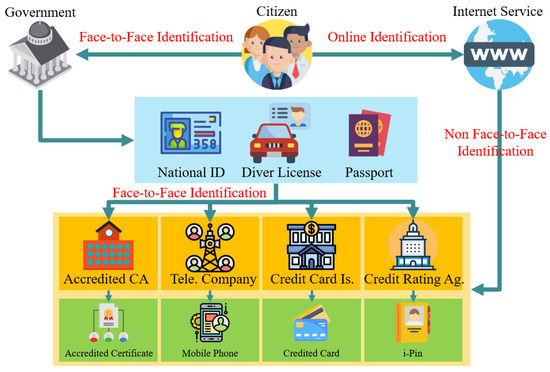
A Korean phone number is widely used for mobile identity verification, but it is not the country’s only recognized method. Korea’s identity-verification system also supports alternatives such as i-PIN, credit-card verification, and certificate-based verification. Whether any of these options appears depends on the website or institution providing the service.
The best recovery path therefore depends on the type of account. A social platform may accept an existing login session or recovery email, while a bank or payment service may require stronger verification. Users should follow the instructions of the specific provider rather than sending identity documents based on a general online guide.
Emergency Account Recovery Guide When SMS Cannot Be Received from a Korean Phone Number
When an SMS code does not arrive, first determine whether the problem involves the account, the mobile line, or the roaming connection.
Step 1: Immediately Stop Requesting SMS Resend Codes
Do not repeatedly press the resend button. Services can impose temporary limits when verification requests occur too frequently, but there is no universal Korean rule stating that three attempts always produce a 24-hour block.
Read the error message shown on the screen. It may state when another code can be requested or whether a different recovery route is required. Also confirm that:
The Korean line is still active.
The SIM or eSIM is enabled.
The device is connected to a roaming partner network.
Spam filtering has not blocked service messages.
The phone has been restarted after arriving abroad.
The registered phone number still matches the account.
If the number has been terminated, waiting for another SMS will not solve the problem.
Step 2: Leverage Alternative Verification Methods (Fallback Verification)
Review the complete login and recovery page. Available alternatives may include:
A recovery email.
Approval from a device that is already signed in.
A QR-code or one-time-number login.
A previously issued backup code.
An authenticator application.
An i-PIN, certificate, or card-based identity method.
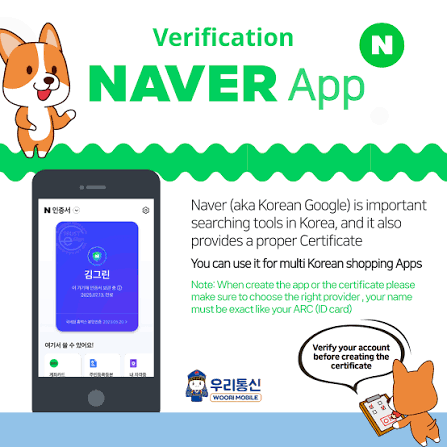
NAVER’s current login page, for example, presents QR-code login and one-time-number login in addition to the normal ID and password flow. Availability may change by device, account state, and security settings.
Do not assume that switching the interface to Korean will reveal hidden recovery functions. Language settings may change labels, but recovery options are normally determined by the account and service configuration.
Preserve any device that remains logged in. Do not sign out, clear application data, reset the phone, or remove trusted devices until recovery information has been updated.
Step 3: Manual Identity Verification Submission Process
Contact support only through the official app, website, or published customer-service number. Explain which step fails and provide non-sensitive account information first, such as:
Account ID or registered email.
Former Korean phone number.
Approximate account creation date.
The exact error message.
Current country and contact method.
Recent legitimate account activity that the provider asks you to confirm.
Submit a passport, residence card, selfie, or signed statement only when the provider explicitly requests it through a secure official channel. Required documents vary considerably. Google warns users not to upload documents other than the requested ID during its identity-verification process because unsupported submissions can create additional account problems.
Never send identity documents through social-media messages, unofficial email addresses, open community boards, or links provided by unknown “recovery agents.”
Handling Identity Verification Issues (AdSense / Online Services) for People Abroad
Monetization, financial, and regulated services often separate login recovery from formal identity verification. Recovering access to an email account does not automatically satisfy payment-profile or banking requirements.
Case of Korean Google AdSense Accounts
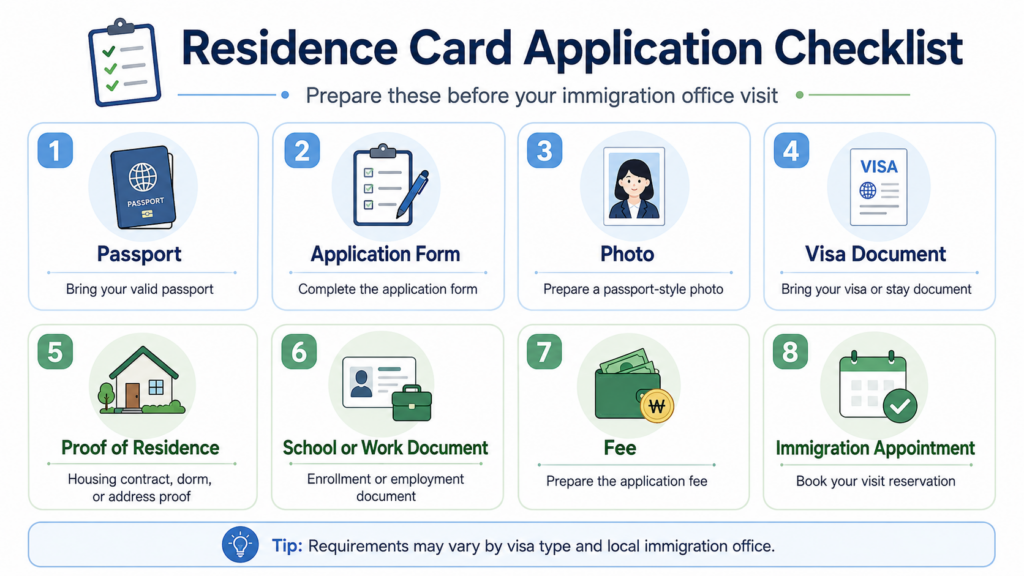
Google AdSense identity verification is not simply an SMS check. Google may request a current government-issued photo ID, such as a passport, driver’s licence, or national identity card.
Google states that it can verify only IDs whose issuing country matches the country in the payments profile. When the document and profile countries differ, users are instructed to use Google’s identity-verification troubleshooter. Google also limits the number of document-verification attempts.
This means that an active Korean SIM is not, by itself, enough to complete AdSense identity verification. The account name, payments profile, country, and submitted document must satisfy Google’s current requirements.
Do not close an established AdSense account or create another account based only on a forum recommendation. First review the personalized notice inside AdSense and use the official troubleshooter or support route available to the account. Account closure, unpaid balances, tax details, and duplicate-account restrictions can complicate an unnecessary migration.
Case of Online Services and Banking
Banking procedures differ by institution and transaction. Some functions may remain available through a banking application, certificate, security card, OTP device, or an existing trusted device. Other changes may require a new identity check or branch-level review.
Do not assume that every Korean bank offers video verification to customers abroad or that a relative can complete the process with a standard letter of authorization. Before preparing a power of attorney, ask the bank for:
Its required form.
Whether notarization or consular confirmation is needed.
Which original documents must be submitted.
Whether the requested transaction can legally be delegated.
The validity period of the documents.
Use the bank’s official overseas customer-service number. Never disclose an OTP, security-card sequence, certificate password, or remote-control access to someone claiming to assist with recovery.
Why Tourist SIMs / Temporary 010 Numbers Cannot Be Used for Identity Verification (본인인증) in Korea
The heading describes a common problem, but tourist and prepaid products do not fail in every case. Eligibility depends on whether the phone line is registered to the user and whether that carrier and product support the requested identity-verification service.
How the Bonin Injeung (본인인증) System Works
In mobile identity verification, the user selects a carrier and enters subscriber information. The verification provider confirms the information registered with the carrier and then verifies possession through PASS, QR, SMS, or another supported flow.
NICE explains that a successful mobile verification can return fields selected by the requesting service, including the user’s name, birth date, domestic or foreigner status, carrier, phone number, and CI or DI identifier.
It is therefore more accurate to say that the system verifies the subscriber record and possession of the phone than to describe it as one simple direct search of a national database.
Korean identity verification is also not limited to SKT, KT, and LG U+ postpaid plans. PASS states that supported MVNO customers can use the service, and foreign residents can use it when they are eligible for mobile identity verification and can register the application.
Reasons Tourist SIMs and Temporary Numbers May Fail
Data-Only Products: A data-only eSIM may have no Korean mobile number capable of receiving verification messages.
Unregistered or Rental Lines: A number registered to a business, rental operator, or another individual will not match the user’s identity.
Unsupported Prepaid Products: Some prepaid or short-term products do not support PASS or identity-verification services even when they can receive ordinary SMS.
Name-Matching Problems: Differences in spacing, order, spelling, or romanization between the carrier record and the online account can cause verification failure.
Expired Residence Information: A foreign resident’s carrier record may no longer match the current immigration or identity information used by the service.
VoIP and Virtual Numbers: Internet-based numbers generally do not represent a qualifying Korean mobile subscriber record and may be rejected by services requiring carrier identity verification.
Borrowing another person’s SIM does not establish the borrower’s identity. The verification result corresponds to the registered subscriber, not the person holding the phone.
Preparing Security Backup Options Before Traveling Abroad
Account recovery is far easier when backup methods are configured before departure.
1. Switch to a Budget Plan (MVNO / 알뜰폰) to Maintain Your Number
Keeping an active Korean number can be useful, but do not select a plan solely because it is inexpensive. Confirm in writing that the exact plan supports:
International roaming in the destination country.
Receiving SMS while abroad.
Mobile identity verification.
The required prepaid or postpaid status.
Long-term overseas suspension or number-maintenance options.
MVNO roaming support varies by carrier and plan. Fees also change, so the fixed KRW 2,000–5,000 range in the original draft should not be presented as a general market rule.
Receiving roaming SMS may be free under a particular carrier’s policy, but this should not be generalized to every provider. KT, for example, currently states that incoming roaming SMS, LMS, and MMS are free and offers a separate long-term overseas service that preserves SMS-based verification for a monthly fee. That product excludes certain plans and does not support PASS authentication while suspended.
Set Up Multi-Factor Authentication (MFA)
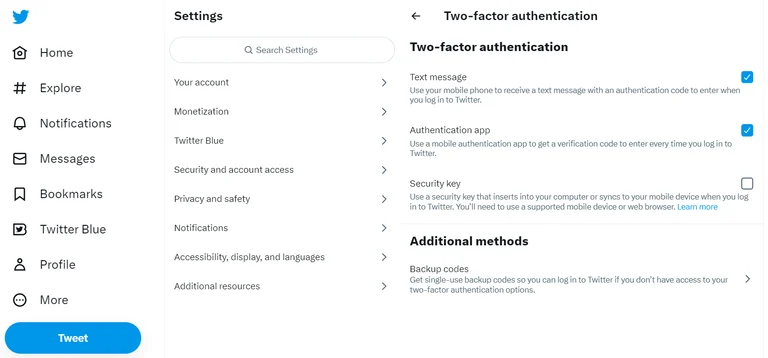
Enable non-SMS authentication wherever the service supports it:
Authenticator-app codes.
Hardware security keys.
Passkeys.
Backup codes stored offline.
Approval through an already authenticated device.
A verified recovery email.
Do not assume that one authenticator application can replace Korean mobile 본인인증. Authenticator codes protect account login, while carrier identity verification confirms a subscriber’s identity for a specific service.
Before leaving Korea:
Update phone numbers and recovery email addresses.
Generate new backup codes and store them outside the phone.
Confirm that trusted devices are still recognized.
Renew certificates that are close to expiration.
Test login from a second device.
Record official overseas support numbers.
Keep encrypted copies of essential documents.
Avoid relying on a single phone containing the SIM, authenticator, recovery email, and all backup codes. Losing that device can remove every recovery route at the same time.
Losing access to a Korean phone number abroad can affect many services, but there is no single recovery procedure for every Korean platform. Start by confirming that the line is active and connected to roaming. Stop repeated SMS requests when the service displays a limit, preserve already authenticated devices, and use only the fallback methods shown by the provider.
Mobile identity verification relies on subscriber information registered with a supported carrier. Some MVNO and foreign-resident accounts can qualify, while data-only, rental, unregistered, or unsupported temporary SIMs may not. For AdSense, banking, and payment services, follow the institution’s official verification process. Do not upload extra identity documents or use an unofficial recovery agent.
Before future travel, maintain several independent recovery methods: a working phone line when necessary, an authenticator or security key, backup codes, a verified email, trusted devices, and current certificates. The strongest setup is one that continues working even after one phone number or device becomes unavailable.